// Discord bot for Chess.com

Your Chess.com stats, right inside Discord.

ChessBot brings Chess.com to your Discord server. Look up any player, show off your ratings, compare yourself with friends, and give your community rating roles that update themselves. All of it comes back as clean, shareable images.

Example /stats image: a player's overall rating, wins, losses and draws, split into rapid, blitz and bullet
// 01 — Why ChessBot?

Why ChessBot?

  • 01

    Images, not walls of text

    Every stats, profile and compare result is a high-resolution card made to be shared.

  • 02

    Link once, use everywhere

    Link your Chess.com account, then run any command with no username. You can also @mention a friend to see their stats.

  • 03

    No password needed

    You prove the account is yours with a quick, safe check on your Chess.com profile.

  • 04

    Rating roles that keep themselves up to date

    Server members get roles based on their real Chess.com rating, refreshed every day.

  • 05

    Works anywhere

    Use it in servers or in DMs.

// 02 — Features

Features

Run a command on yourself, a friend (@mention), or any Chess.com username.

/stats Full rating breakdown

A detailed stats card for any Chess.com player.

The /stats image for a player, with pie charts of wins, losses and draws per time control
  • Overall, Rapid, Blitz and Bullet shown side by side
  • Rating, games played, wins, losses and draws for each time control
  • Win, loss and draw percentages
  • An overall rating that averages only the time controls you actually play, so a mode you never touch doesn’t pull it down
  • The player’s name, avatar and today’s date

Run it on yourself, a friend (@mention), or any Chess.com username, even Magnus.

/profile Player profile card

A profile card for any account.

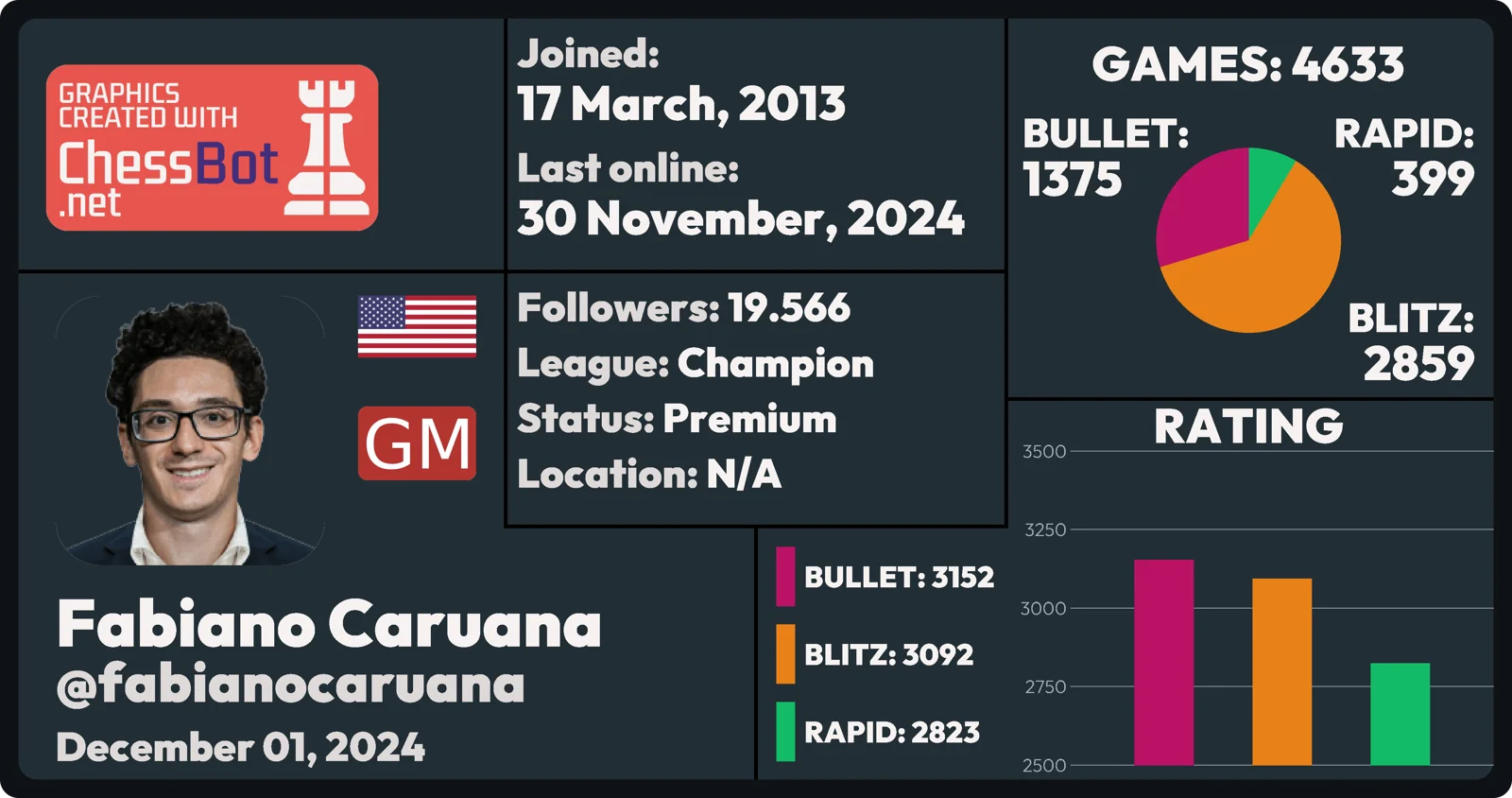
The /profile image: avatar, title badge, country flag, join date, followers, league and a rating bar chart
  • Avatar, display name and username
  • Country flag and chess title badge (GM, IM, FM, CM, NM, WGM, WIM, WFM, WCM, WNM)
  • Followers, league, account status and location
  • Join date and last time online
  • Games played and rating for each time control, with a rating bar chart
  • A “View Profile” button that opens the player’s Chess.com page

/compare Head-to-head (2–4 players)

Settle the argument. Compare up to 4 players on one image.

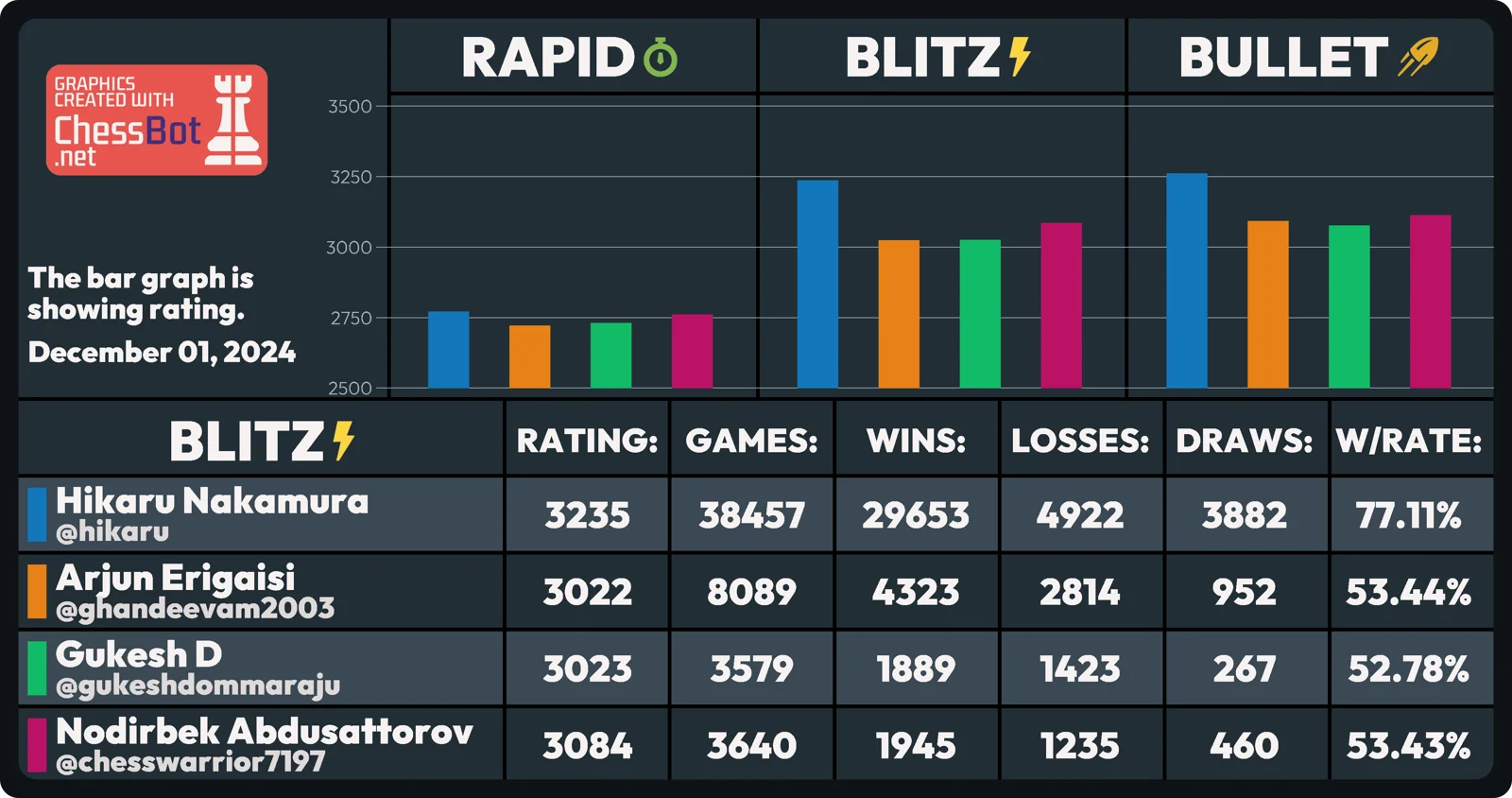
The /compare image: four players' ratings as bar charts plus a table of games, wins, losses, draws and win rate
  • Pick a category: Overall, Rapid, Blitz or Bullet
  • Rating, games, wins, losses, draws and win rate for each player
  • A bar chart of everyone’s ratings
  • Mix usernames and @mentions freely, e.g. MagnusCarlsen, Hikaru, @yourfriend

Link your accounts in seconds. No password and no login.

  • To verify, you put your Discord username in your Chess.com “Location” field and press Done!
  • Run /link with no username to see which account you’ve linked
  • Unlink or switch accounts with one button
  • After linking, you get your server’s rating roles straight away

/help Get started

A quick guide to every command, with links to the docs, website, invite link and support server.

// 03 — For server admins

Rating roles

Turn your server into a ranked community. Members get roles based on their Chess.com rating.

CommandWhat it does
/elo-setupCreates rating roles such as Elo 1200-1399 and Elo 2800+
/update-elo-rolesRefreshes everyone’s roles right now
/erase-elo-rolesRemoves every role ChessBot created

Only members with the Manage Server permission can use these commands.

  • Fully customizable: set the minimum rating, maximum rating and the size of each band (default: 0–3000 in steps of 200)
  • Title roles: GM, IM, FM, CM, WGM, WIM, WFM and WCM players get a matching role
  • Roles are based on each member’s best rating across Rapid, Blitz and Bullet
  • Daily automatic updates: roles follow members’ ratings as they climb, with no admin work
  • The top role covers everyone above the maximum, so strong players are never left without one
// 04 — At a glance

At a glance

ChessBot is always in development. Stay tuned for more!

Data source
Chess.com public API
Player commands
/stats /profile /compare /link /help
Admin commands
/elo-setup /update-elo-roles /erase-elo-roles
Account linking
Verified through your Chess.com profile, no password
Role updates
Automatic, every 24 hours

Ready to bring chess to your server?

Invite ChessBot and type /help to get started.